
Understanding property boundaries, land use, and geographic data has never been easier thanks to modern mapping technology. The Hamilton County GIS map, officially managed through CAGIS (Cincinnati Area Geographic Information System), provides residents, property buyers, real estate professionals, and researchers with instant access to detailed land information and parcel data. Whether you’re planning to purchase property in Cincinnati, researching zoning regulations in Hamilton County, or simply curious about land boundaries in your neighborhood, this geographic information system offers valuable insights at your fingertips.
This comprehensive guide walks you through everything you need to know about the Hamilton County GIS map, from basic navigation to advanced features. You’ll learn how to access property boundaries through the official CAGIS platform, understand zoning districts, interpret map layers, and extract accurate land data for your specific needs. Geographic information systems have revolutionized how we interact with property records, making complex spatial data accessible to everyone with an internet connection. Let’s explore how the Hamilton County GIS map can serve your property research and planning needs.

What Is a GIS Map?
A GIS map, or Geographic Information System map, is a digital mapping tool that displays geographic data in visual layers. Unlike traditional paper maps that show only basic features like roads and landmarks, GIS maps combine multiple data layers including property boundaries, zoning information, topography, infrastructure, and demographic details. The system allows users to view, analyze, and interpret spatial relationships between different geographic features.
The key difference between a GIS map and a regular map lies in interactivity and data depth. Traditional maps are static images showing fixed information, while GIS maps are dynamic tools that let you toggle layers on and off, search specific locations, measure distances, and access detailed property records. When you click on a parcel in Hamilton County’s CAGIS system, you can instantly retrieve information about ownership, size, tax assessment, zoning classification, and land use.
In property and land records management, GIS maps serve as centralized databases connecting spatial locations with legal and administrative information. The Hamilton County Auditor’s Office uses CAGIS technology to maintain accurate parcel boundaries, track property transfers, calculate tax assessments, and manage land use planning. Real estate professionals rely on GIS data to verify property lines, identify development opportunities, and assess neighborhood characteristics. The technology transforms raw geographic data into actionable intelligence for decision-making.
Overview of the Hamilton County GIS Map
The Hamilton County GIS system, branded as CAGIS (Cincinnati Area Geographic Information System), serves as the official digital repository for all geographic and property-related data within Hamilton County, Ohio. This comprehensive mapping platform is an enterprise-wide consortium that integrates information from multiple government agencies including the Hamilton County Auditor’s Office, City of Cincinnati, Planning and Development Department, and local utilities. The system serves over 2,000 employees across 20 different agencies in mission-critical business operations.
CAGIS is headquartered at the Hamilton County Administration Building in Cincinnati. The primary purpose is to provide transparent access to land records while supporting efficient government operations and informed community planning through real-time technology solutions.
County residents use the CAGIS map for various practical purposes, from verifying their property boundaries before installing fences to researching school district assignments when house hunting. Prospective property buyers rely on the system to investigate zoning restrictions, identify flood-prone areas, and understand neighborhood characteristics before making purchase decisions. Real estate agents access the map to prepare accurate property listings and answer client questions about land features. Researchers, developers, attorneys, environmental consultants, and urban planners use Hamilton County’s GIS data for market analysis, feasibility studies, legal verification, and development proposals.
What Information You Can Find on the Hamilton County GIS Map
| Data Category | Information Available on CAGIS |
|---|---|
| Parcel Boundaries | Property lines, lot dimensions, acreage, legal descriptions based on professional surveys |
| Zoning & Land Use | Zoning classifications, permitted uses, overlay districts, jurisdiction boundaries |
| Tax Information | Tax districts, parcel numbers, deed numbers, sale dates and amounts |
| Aerial Imagery | Historical photos from 1996 to 2016+, current aerial photographs |
| Planimetric Data | Building outlines, pavement, driveways, parking lots, sidewalks, trails, walls, poles |
| Infrastructure | Roads, storm water, sewer utilities, construction project areas |
| Administrative Data | Municipal and township boundaries, census tracts and blocks |
| Address Information | Real-time address and street data, most complete location information for the county |
The Hamilton County CAGIS map displays parcel and property boundaries with precision surveying accuracy based on professional survey information. Property boundaries are recorded using coordinate geometry (COGO), with metes and bounds from property surveys digitized into the mapping system. Each parcel is represented as a distinct polygon showing exact property lines, dimensions, and total acreage. You can identify where your property ends and neighboring parcels begin—essential information for fence installation, landscaping projects, or boundary dispute resolution.
Property location and nearby parcels are easily identifiable through the CAGIS Online interactive map interface. The system shows your parcel in relation to surrounding properties, streets, and landmarks using real-time address and street information maintained as part of the geographic framework. This spatial context helps you understand neighborhood layout, proximity to amenities, and potential development on adjacent lots. You can click neighboring parcels to view their details and compare property characteristics.
Zoning areas and land use designations indicate what activities are permitted on each parcel. CAGIS maintains comprehensive ownership and administrative data including zoning classifications, land use categories, and municipal boundaries. Residential, commercial, industrial, agricultural, and mixed-use zones are displayed for quick identification. Understanding zoning is crucial before purchasing property or planning development projects, as these regulations control building types, density, setbacks, and permitted business activities.
Aerial photographs provide visual context for property research. CAGIS acquired its latest aerial imagery in March 2011, covering the entire Hamilton County and parts of Butler, Warren, and Clermont counties. The system includes historical aerial photographs dating from 1996 to 2016, allowing users to see how properties and neighborhoods have changed over time. These images help visualize actual land features like buildings, trees, terrain, and development patterns.
Planimetric data shows outlines of land features visible from aerial photography, created using industry-standard photogrammetric procedures by trained professionals. This includes building structures, pavement edges, driveways, parking lots, sidewalks, trails, walls and guardrails, utility poles, rivers and streams. This detailed information supplements parcel boundaries to give you a complete picture of what exists on the property.
Infrastructure and workflow data includes road construction project information through the County Wide Construction Coordination (CWCC) system, which allows road and utility agencies to communicate and coordinate construction projects across multi-jurisdictional boundaries. Building permits and inspection records are also integrated into the GIS framework, though some workflow data is not currently available online.
How to Use the Hamilton County GIS Map (Step-by-Step)
Accessing the Official CAGIS Map
The official Hamilton County GIS map is accessed through CAGIS Online. You can also access the map through the Hamilton County government website under the Maps/GIS section, or through the Hamilton County Auditor’s property search, which includes direct links to CAGIS maps for each parcel.
Using the official CAGIS source matters because it guarantees data accuracy, regular updates, and legal reliability. CAGIS property boundary data is based on professional survey information and meets or exceeds the National Map Accuracy Standards for 1″=100′ base maps for both horizontal and vertical accuracy. Third-party mapping services may display outdated information, incorrect boundaries, or incomplete records. The official CAGIS system connects directly to authoritative databases maintained by government surveyors and assessors, ensuring you’re viewing the most current and legally recognized property information available.
Browser compatibility note: CAGIS Online works best with current versions of Google Chrome, Firefox, or Internet Explorer. If using IE 8 or later, turn off “Compatibility View” for optimal performance. Creating presentations is not supported in Internet Explorer versions 6 or 7.
Searching Locations on the Map
Search by address is the most straightforward method for locating property on CAGIS Online. Enter the street number and name into the search bar, and the system will zoom directly to that parcel and highlight it on the map. CAGIS maintains real-time address and street information, providing the most complete and up-to-date location data for Hamilton County. This method works well when you know the property’s physical address but don’t have technical details like parcel numbers.
Using zoom and pan tools effectively enhances your map navigation experience. Use the plus/minus buttons or mouse scroll wheel to zoom in for detailed boundary views or zoom out for neighborhood context. Click and drag to pan across different areas. Most GIS systems include a “zoom to extent” button that resets the view. CAGIS allows you to create sophisticated maps tailored to your needs, with the ability to add labels, graphics, and comments to customize your view.
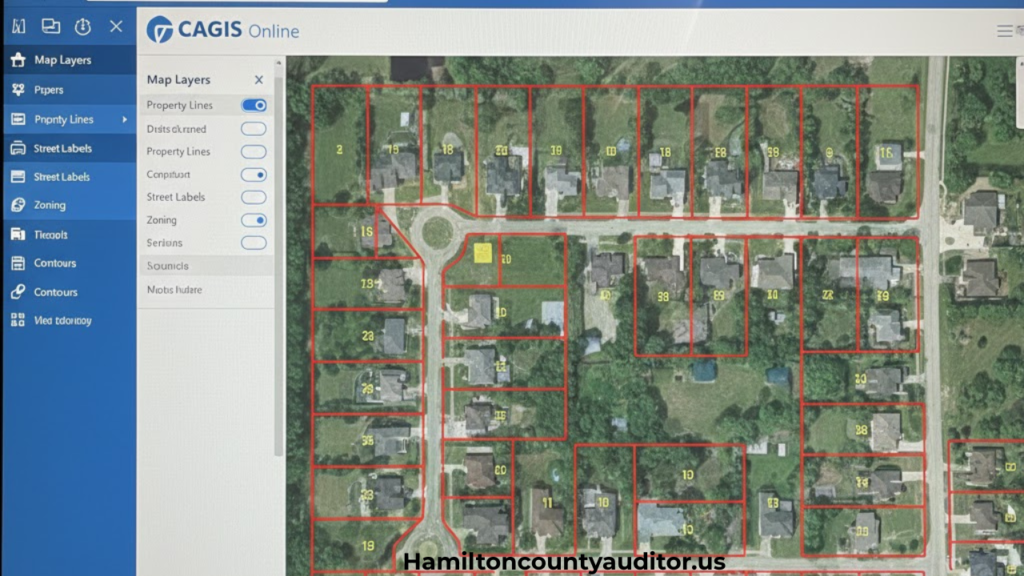
Understanding CAGIS Map Layers
What layers are: Layers are separate data sets displayed on top of the base map, each representing different types of geographic information. CAGIS organizes data into categories including planimetric data, ownership/administrative data, raster data (aerial imagery), and underground utility data. Think of layers like transparent sheets stacked together—each showing different details such as parcels, streets, zoning, building footprints, or aerial photos. The GIS system combines these layers to create comprehensive visualizations of complex spatial relationships.
Turning layers on and off allows you to customize what information displays on your CAGIS map. The system includes street, topography, and property base maps, along with aerial photographs. Additional GIS layers can be added to these base maps based on your research needs. The layer control interface lets you toggle different data categories on or off to reduce visual clutter and focus on relevant information. For property research, you might enable parcel boundaries, zoning, and aerial imagery while turning off layers like construction projects or utility infrastructure.
How layers help explain property data: By combining multiple CAGIS layers, you gain deeper insights into property characteristics. Overlay zoning boundaries on parcel data to see if your property spans multiple zones. Add aerial imagery beneath parcel lines to visualize actual land features like buildings, trees, and terrain captured in the photogrammetric surveys. Layer building footprints with property boundaries to understand structure placement and setbacks. This multi-layered approach transforms simple maps into powerful analytical tools, with reporting tools that identify property ownership, jurisdiction, zoning, land development, sale dates and amounts, deed numbers, and more.
Hamilton County GIS Map vs Property Search Tools
The Hamilton County CAGIS map excels when you need visual context, spatial relationships, and boundary precision. Use CAGIS Online to see exactly where property lines fall based on professional survey data, understand neighborhood layout, measure distances between parcels, identify nearby features visible in aerial photography, and analyze zoning patterns across areas. The visual interface makes spatial analysis intuitive and reveals patterns that text-based searches miss. CAGIS’s photogrammetric planimetric data shows building outlines, pavement, driveways, and other land features with high accuracy.
Property search tools (like the Hamilton County Auditor’s database) are better for detailed ownership records, sales history, tax assessment details, levy information, transfer history, Board of Revision appeals, payment details, and tax distributions. These text-based databases provide comprehensive property details in organized formats but lack the visual spatial context that CAGIS maps offer. The Auditor’s property search efficiently answers questions about who owns property, when it last sold, what it’s worth for tax purposes, and what special assessments apply.
Both tools work together synergistically for complete property research. The Hamilton County Auditor’s property search pages include direct links to CAGIS Online Maps and Aerial Imagery for each parcel, integrating both systems seamlessly. Start with CAGIS to locate and visualize parcels, then use the parcel number you find to search the Auditor’s database for detailed records. Conversely, begin with the Auditor’s property search to identify parcels meeting specific criteria (owner name, sale price, address), then click the CAGIS map link to assess location and surroundings. Combining both tools provides the most thorough property intelligence available for Hamilton County.
Common Issues Users Face When Using GIS Maps
Map loading problems occur due to slow internet connections, server maintenance, browser compatibility issues, or outdated software. If CAGIS Online won’t load, try refreshing the page, clearing browser cache, switching to Google Chrome or Firefox (which work best with the system), or checking your internet connection. During peak usage times, county servers may experience slowdowns. Enable JavaScript in your browser settings for full functionality, and make sure you’re not using Internet Explorer 6 or 7, which are no longer supported. If using IE 8 or later, disable “Compatibility View” as recommended by CAGIS.
Difficulty understanding boundaries arises because CAGIS displays technical survey data that can appear confusing to non-professionals. Property lines shown in the system are based on legal metes and bounds from recorded surveys, not physical features like fences or tree lines. This often confuses users expecting boundaries to match visible markers on the ground. Zooming in closely helps reveal boundary details and building footprints, but remember that fences and other features don’t necessarily indicate legal property lines. CAGIS data meets National Map Accuracy Standards, but physical improvements may have been placed incorrectly relative to actual property boundaries.
Concerns about data accuracy are valid since GIS maps rely on survey data that may be updated on different schedules. While CAGIS is generally highly accurate and based on professional survey information using coordinate geometry (COGO), it may not reflect very recent transactions, recent subdivisions, or disputed boundaries. CAGIS aerial imagery was last acquired in March 2011 for full county coverage, so newer construction won’t appear in older imagery layers. The system includes disclaimers stating that data is for informational purposes only and should not be used as the sole source for engineering design, legal cases without court approval, or insurance claims. For legal purposes or major transactions, verify CAGIS information with recorded deeds, current professional surveys, and title companies.
Tips for Getting Accurate Results from the GIS Map
Selecting the correct parcel requires careful attention, especially in densely developed areas where parcels are small and closely packed. After searching CAGIS Online, verify you’ve selected the intended property by checking the displayed address against your known information. Use the reporting tools to confirm parcel number, owner name, and property details. In corner lots or irregular parcels, zoom in closely and enable aerial imagery to ensure you’re viewing the right property boundaries. CAGIS’s real-time address and street information provides the most complete location data for verification.
Using proper zoom levels balances detail with context on CAGIS maps. Zoom in close enough to clearly see parcel boundaries, building footprints from planimetric data, and property lines from survey information, but not so close that you lose surrounding context. For boundary verification, zoom to a level where you can see individual building structures, pavement edges, and landscape features captured in the photogrammetric surveys. For neighborhood analysis, zoom out to view multiple blocks while still distinguishing individual parcels. The system allows you to add labels and graphics to mark areas of interest at different zoom levels.
Verifying information with property search pages adds a crucial accuracy check. Cross-reference what you see on CAGIS maps with the Hamilton County Auditor’s property search database. Confirm that parcel numbers, addresses, and basic property details match between systems. The Auditor’s database typically contains more current ownership information, recent sales data, and tax assessment updates, while CAGIS maps have more accurate spatial and boundary data based on professional surveys. Use the integrated links between both systems—the Auditor’s property pages include direct CAGIS map links for seamless verification.
Who Should Use the Hamilton County GIS Map?
Property buyers benefit enormously from CAGIS maps during house hunting and due diligence in Hamilton County and Cincinnati. Before making offers, prospective buyers can verify lot sizes using professional survey-based boundaries, check zoning restrictions through administrative data layers, view aerial photographs to assess property conditions, and understand property boundaries with high accuracy. The visual format helps buyers evaluate neighborhood characteristics through historical imagery dating to 1996 and make informed decisions about property suitability and value.
Real estate professionals use CAGIS maps daily for listing preparation, client consultations, market analysis, and property comparisons throughout Hamilton County. Agents can quickly pull up property boundaries based on coordinate geometry for listing photos, verify zoning for commercial prospects, identify comparable properties in specific areas using the sophisticated mapping tools, and answer client questions about lot dimensions and neighborhood features with visual references from planimetric and aerial data. The ability to create custom maps with labels and graphics supports professional presentations.
Researchers and analysts rely on CAGIS data for academic studies, market research, planning proposals, and environmental assessments. The system allows users to download public GIS layers including parcel polygons, buildings, pavement, and contours through the CAGIS download page. Data is available in AutoCAD DXF, ESRI shape, or file geodatabase format, with raster data in MRSID, TIFF, or JPG formats. This downloadable data enables quantitative research and spatial analysis projects that text-based records cannot support, with data meeting National Map Accuracy Standards.
Local residents use CAGIS for everyday practical needs: planning home improvements using building footprint data, resolving boundary questions with neighbors using professional survey information, understanding local development proposals through the County Wide Construction Coordination system, checking building permits through the integrated ezTrak system, and staying informed about land use changes. The accessible interface empowers Hamilton County citizens with information that was once difficult to obtain, with office hours Monday-Friday 8am-5pm for support.
Frequently Asked Questions (FAQs)
Is the Hamilton County GIS Map free to use?
Yes, CAGIS Online is free and publicly accessible at cagis.hamilton-co.org and cagisonline.hamilton-co.org. No registration, fees, or special permissions are required to view property boundaries, zoning data, aerial imagery, and other public information. GIS layers are also available for free download.
Does the GIS map show property ownership details?
Yes, CAGIS reporting tools identify property ownership information including owner names when you click on parcels. For complete ownership history, sales records, and tax details, use the integrated Hamilton County Auditor’s property search, which links directly to CAGIS maps.
Is information from the GIS map legally binding?
No, CAGIS data is for informational purposes only and is not legally binding. CAGIS specifically states data should not be used as the sole source for engineering design, legal cases without court approval, or insurance claims. For legal matters, rely on recorded deeds, professional surveys, and title documents.
How often is the Hamilton County GIS map updated?
Update frequency varies by data type. Parcel boundaries and address information are maintained in real-time as part of enterprise workflows. The latest countywide aerial imagery was acquired in March 2011, with historical photos from 1996-2016. Building permit and construction project data updates regularly through integrated systems.
Can I measure distances and areas on the GIS map?
Yes, CAGIS Online includes sophisticated mapping tools that let you calculate distances, perimeters, and areas. You can also add labels, graphics, and comments to create custom maps. Measurements meet National Map Accuracy Standards for 1″=100′ base maps but are estimates for planning purposes, not legally precise survey figures.
What should I do if I find errors on the GIS map?
Contact the CAGIS department or Hamilton County government offices to report discrepancies. Provide specific details including parcel numbers, addresses, and descriptions of errors. The county appreciates error reports as they help maintain data accuracy across the system.
Can I download GIS data from CAGIS?
Yes, CAGIS offers free download of public GIS layers including parcel polygons, buildings, pavement, and contours. Visit the CAGIS download page to access data in AutoCAD DXF, ESRI shape, or file geodatabase format. Raster data is available in MRSID, TIFF, or JPG formats. Standard paper maps up to 36″x60″ are also available for purchase.
Does the GIS map work on mobile devices?
CAGIS Online is accessible on smartphones and tablets, though full functionality may be limited on smaller screens. For detailed analysis using multiple layers, sophisticated mapping tools, and creating custom presentations, desktop computers provide better experiences. CAGIS also supports mobile applications like “Fix it Cincy!” for specific functions.
Conclusion
The Hamilton County GIS map, managed through the CAGIS (Cincinnati Area Geographic Information System) platform, stands as an essential resource for anyone interested in property information, land data, and geographic analysis in Hamilton County, Ohio. This powerful tool, serving over 2,000 government employees and countless public users across 20 agencies, transforms complex spatial data into accessible visual information through professional survey-based boundaries, aerial photography, and comprehensive administrative records.
Whether you’re a property buyer researching parcels in Cincinnati, a homeowner verifying boundaries, a real estate professional preparing listings, or a researcher conducting spatial analysis, CAGIS provides the accurate, real-time geographic data you need. The system’s integration with the Hamilton County Auditor’s Office and other government agencies ensures you have access to the most reliable property information available.
For access to the official Hamilton County GIS map and property records, visit the Hamilton County government website or contact the appropriate county offices for assistance. For technical support, reach out to CAGIS at (513) 352-1980 or CagisAppSupport@cincinnati-oh.gov.